

A payroll workflow defines how payroll information moves from the client to the payroll team and into the payroll system. Structured workflows are essential for consistency, visibility and reliability.
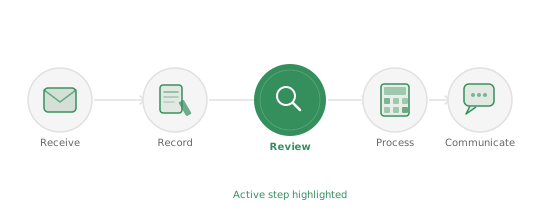
Without structured workflows, tracking these activities at scale relies on emails, shared spreadsheets and individual knowledge. That works until it doesn't.
Every payroll cycle involves a stream of client updates that must be received, verified and processed within strict deadlines. Starters, leavers, salary changes, statutory payments, benefits updates - all of it needs to land correctly before payroll runs.
A structured workflow ensures that every change is captured, reviewed and confirmed before payroll calculations begin, reducing the risk of missed or incomplete updates.
Payroll teams depend on clients to submit accurate information on time. When that communication runs through email, instructions get buried, queries go unanswered and the audit trail is an inbox search.
Structured workflows capture client instructions clearly, link them to the relevant payroll activities, and give every team member a traceable record of what was submitted, when, and by whom.
As payroll teams grow, visibility becomes critical. Without clear operational oversight, it is difficult to know which payroll tasks are in progress, which changes are awaiting review, where bottlenecks are forming, and how workload is distributed across the team.
Structured workflows give payroll leaders a live view across all of these, without needing to ask.
When payroll teams operate across multiple offices, or when a growing firm has several people managing different client groups, consistent workflows become essential. Without them, each team develops its own habits - and over time, those habits diverge.
Standardising how payroll information is received, recorded and processed means new team members onboard into a defined process rather than someone else's informal system. It also means the service holds up if a key person is off - because the knowledge lives in the workflow, not in their head.
For firms looking to expand their payroll services, see Scaling Payroll Services.
Changepen introduces structured payroll workflows alongside existing payroll software - not instead of it. Client instructions, payroll changes and team coordination are managed within defined workflows.
Payroll software continues to handle calculations and compliance. Changepen handles the coordination that ensures everything arrives correctly, is processed on time, and leaves a full audit trail.
For a full explanation of the operational layer around payroll, see Payroll Operations. For firms looking to expand their payroll services, see Scaling Payroll Services.
Large accountancy firms delivering payroll across multiple offices, teams and client portfolios.
• Multiple payroll teams • Regional offices • Large payroll client portfolios • Multiple payroll platforms
Explore Enterprise SolutionAccountancy firms expanding their payroll services and growing their payroll client portfolios.
• Expanding payroll client base • Growing payroll teams • Increasing client communication • Need for clearer workflows
Explore Growing Firms SolutionSpecialist payroll providers delivering payroll services for large numbers of clients.
• High volume payroll clients • Continuous payroll changes • Client communication management • Workflow coordination
Explore Payroll Bureau SolutionBook a demo with the Changepen team to see how the platform can reduce admin, cut errors and strengthen your client relationships.
Payroll workflow management is the practice of structuring and coordinating the steps in each payroll, from receiving information to recording changes, reviewing for accuracy and communicating outputs, so every payroll runs consistently and nothing is missed. It is a core part of payroll operations management.
Payroll operations software is the platform that manages the workflow around payroll calculation, including change capture, scheduling, helpdesk, approvals and real-time visibility. It works alongside your existing payroll engine rather than replacing it.
Payroll software calculates pay. A payroll workflow is the sequence of operational steps around that calculation. Managing the workflow well is what keeps a payroll service accurate and on time as it scales.
