What Are Payroll Operations? A Guide for Bureaus & Accountancy Firms

What payroll operations are and why they break as you scale.

Payroll software handles calculations. Payroll operations is everything else, and it is where most payroll services run into trouble.
Speak to a payroll expert
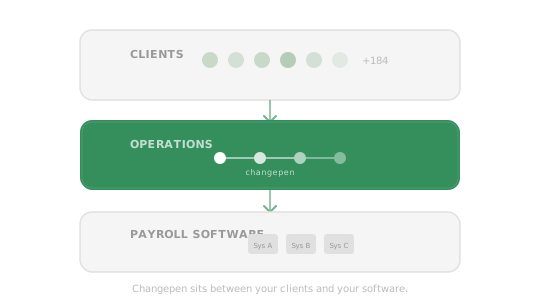
IMAGE NEEDED: Three horizontal layers - Clients (top), Operations with Changepen (middle, green), Payroll Software (bottom). Arrows between layers.

What Are Payroll Operations?

Structured Instruction Capture Green icon showing a clipboard with text lines and a clip at the top, alongside a downward arrow indicating incoming data, representing how Changepen systematically captures and logs all payroll instructions as they arrive.

Collecting payroll information

Payroll Change Tracking Green icon showing a lined document with a pencil angled across it, representing how Changepen enables payroll teams to log, edit, and track every payroll change with a full audit trail.

Managing change requests

Quality Assurance and Compliance Green icon showing a shield shape with a bold tick mark inside, representing how Changepen ensures every payroll run is verified, accurate, and compliant before submission.

Tracking approvals

Payroll Task Scheduling Green icon showing a calendar labelled Payroll Tasks with a grid of six dots in varying shades of green and grey, representing scheduled tasks at different stages of completion across the payroll cycle. PAYROLL TASKS

Coordinating team tasks

The Hidden Complexity of Payroll Services

Payroll software handles the processing layer. It was never designed to manage what surrounds it.

Every payroll cycle involves a continuous flow of instructions, changes and queries that must be received, verified and processed accurately - within tight deadlines and without a single item going missing.

  • Collecting payroll information from clients
  • Managing payroll change requests
  • Tracking approvals and confirmations
  • Coordinating payroll tasks within teams
  • Communicating with clients during the payroll cycle
  • Maintaining records of payroll instructions and changes

All of it arriving through different channels. All of it needing to land correctly before cut-off.

Why Payroll Software Does Not Solve Payroll Operations

Payroll delivery has two distinct layers.

The first is payroll processing: calculations, payslips, RTI submissions, compliance. The second is payroll operations: the workflows, client communication, change management, and team coordination that surround every payroll run.

Payroll software is built for the first layer. The second is typically left to email, spreadsheets, and individual knowledge.

Separating Payroll Operations from Payroll Processing Three-part diagram. On the left, a single grey block labelled Payroll Delivery Combined with a red warning badge and the caption hard to manage. An arrow points right to two separated layers. The top green layer labelled Payroll Operations contains five icons: client comms with a speech bubble, change management with a document and pencil, team coordination with paired people, workflow tracking with a clipboard and tick, and operational visibility with an eye, subtitled workflows communication and coordination. A bidirectional separator labelled managed separately for greater structure connects to the bottom grey layer labelled Payroll Processing, containing four icons: calculations with a calculator, payslips with a pound sign document, RTI with an upload arrow, and compliance with a shield and tick, subtitled calculations compliance and statutory reporting. A green tick badge on the right reads separated clear structure. The footer states when operations and processing are separated payroll teams can introduce structure to how services are delivered. PAYROLL DELIVERY ! Combined Hard to manage PAYROLL OPERATIONS Client Comms Change Management Team Coordination Workflow Tracking Operational Visibility Workflows, communication and coordination Managed separately for greater structure PAYROLL PROCESSING Calculations £ Payslips RTI Compliance Calculations, compliance and statutory reporting Separated Clear structure When operations and processing are separated, payroll teams can introduce structure to how services are delivered

Where Changepen fits within payroll operations

Changepen is the operational layer that sits between clients and payroll software. It captures client instructions, manages payroll workflows, coordinates team tasks, and gives everyone real-time visibility of where each payroll stands.

Payroll software continues to handle calculations and compliance. Changepen manages the coordination that ensures payroll information arrives correctly, gets processed on time, and leaves a clear audit trail.

Operational Complexity Without a Framework Three-column progression diagram. The left column labelled Small Scale shows one client building, two team members, four client cards, and a single payroll software box in grey, captioned simple operations. The centre column labelled Growing Scale shows two client buildings, four team members with crossing connection lines, ten client cards, scattered emails and spreadsheets, and two software boxes in amber, captioned increasing complexity. The right column labelled At Scale No Framework shows three client buildings, eight team members with a dense web of tangled connection lines, twenty-plus client cards in a grid with red-highlighted problem clients, a question mark badge, a clock warning, a limited visibility fog cloud, three separate software boxes, and four red callout badges for growing portfolios, high volume changes, multiple teams, and distributed offices. A gradient bar at the bottom runs from green through amber to red with an arrow, labelled operational complexity, with dots marking each stage. SMALL SCALE GROWING SCALE AT SCALE — NO FRAMEWORK Client A Client B Client C Client D Simple operations Client E Client F Client G Client H Client I Client J Client K Client L Client M Client N Software A Software B Increasing complexity Cl. 1 Cl. 2 Cl. 3 Cl. 4 Cl. 5 Cl. 6 Cl. 7 Cl. 8 Cl. 9 Cl. 10 Cl. 11 Cl. 12 Cl. 13 Cl. 14 Cl. 15 Cl. 16 Cl. 17 Cl. 18 Cl. 19 20+ ? limited visibility Software A Software B Software C Without a framework, teams develop their own processes Growing portfolios High volume changes Multiple teams Distributed offices Operational complexity →

Improving Payroll Operations

Introducing structured payroll operations means replacing informal processes with defined workflows - for how changes arrive, how work is tracked, how clients are communicated with, and how the team coordinates.

The result is a payroll service that runs consistently, scales without chaos, and does not depend on specific individuals holding the knowledge.

Understanding Payroll Workflows and Scaling

For a closer look at how payroll workflows are structured and managed, see our guide to Managing Payroll Workflows.

For firms looking to expand their payroll services, see Scaling Payroll Services.

Which Payroll Environment Do You Operate In?

Payroll operations vary depending on the size and structure of the organisation delivering payroll services.

Explore how Changepen supports payroll operations in your environment.
Enterprise Accountancy Firms

Large accountancy firms delivering payroll across multiple offices, teams and client portfolios.

• Multiple payroll teams • Regional offices • Large payroll client portfolios • Multiple payroll platforms

Explore Enterprise Solution
Growing Accountancy Firms

Accountancy firms expanding their payroll services and growing their payroll client portfolios.

• Expanding payroll client base • Growing payroll teams • Increasing client communication • Need for clearer workflows

Explore Growing Firms Solution
Payroll Bureaus

Specialist payroll providers delivering payroll services for large numbers of clients.

• High volume payroll clients • Continuous payroll changes • Client communication management • Workflow coordination

Explore Payroll Bureau Solution

Ready to transform your payroll operations?

Book a demo with the Changepen team to see how the platform can reduce admin, cut errors and strengthen your client relationships.